Premium license
One Month
Total before tax
€4.50 per month equivalent
- Full feature access
- Starts on purchase date.
- Instant key delivery after payment
Save €0.50
Choose One Month
An OGameX bot for building, research, expeditions, farming, resource movement, auctions, and fleet protection.
Choose the OGameX routines that fit your account, configure their targets and timing, and manage connected automation from one browser extension.
Inside the extension
This is a real capture of the extension interface. Settings depend on your game account and the version offered in the Chrome Web Store.
Explore setup guides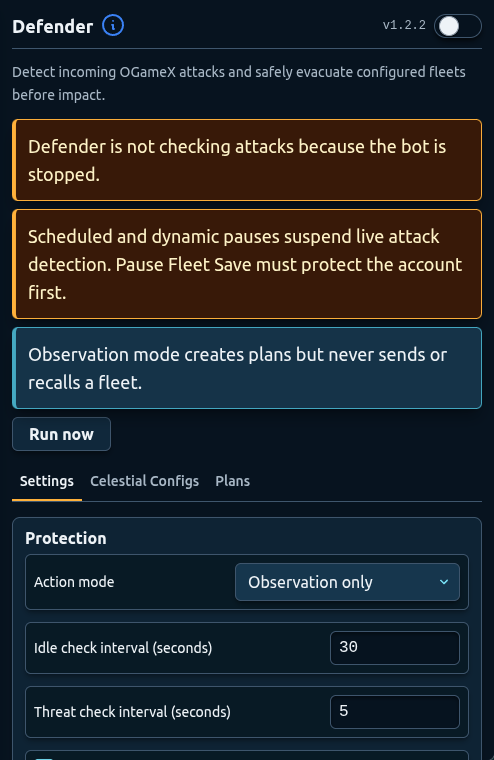
What you need before using OGameX Helper Bot.
Popular license plans
Pick one of the three most popular plans. Every option includes full feature access, and all prices are shown in euro.
Premium license
Total before tax
€4.50 per month equivalent
Save €0.50
Choose One MonthPremium license
Total before tax
€3.75 per month equivalent
Save €3.75
Choose Three MonthsPremium license
Total before tax
€2.75 per month equivalent
Save €27.00
Choose One YearPrices are in euro (EUR) before any applicable tax. Review the final amount at checkout. Additional license durations remain available on the checkout page.
Every main feature is independently configurable, so you can start with a focused routine and expand after reviewing its results.
Monitors incoming attacks, prepares a fleet response, and coordinates evacuation or recall rules before scheduled pauses.
Sends configurable expedition fleets from selected celestials while respecting fleet slots, cargo rules, timing, and return buffers.
Builds farming queues from universe data with configurable targets, cargo, probes, resource thresholds, distance, and attack timing.
Upgrades mines, energy, storage, planet facilities, and moon facilities using per-celestial targets and priority ordering.
Queues supported OGameX research from one selected planet using target levels, priorities, and current prerequisite checks.
Moves resources from a selected source to support building and research requirements across your account.
Automates auction participation with configurable resources, bid limits, timing, player filters, and item-name rules.
Maintains universe scan progress and player data used by farming and other target-aware automation modules.
Handles the online bonus, server promotion, and Import/Export trader checks alongside shared timing and configuration controls.
Use target levels and priorities for buildings and research while Bank movement supplies configured resource requirements.
Configure repeated fleet routines with origins, ship composition, cargo limits, fleet-slot reservations, and target filters.
Combine scheduled downtime with defender checks and pause fleet evacuation settings for selected missions and targets.
Keep universe data current and automate supported daily bonus, promotion, trader, and auction checks.
Install OGameX Helper Bot from the Chrome Web Store, then open a supported OGameX world.
Sign in to Helper Bot, purchase or retrieve your OGameX license key, and activate it for the correct game account.
Choose a small set of routines, check their targets and limits, and add scheduled or dynamic downtime before starting the bot.
Example workflow
Set the number of expeditions per celestial, leave fleet slots free for other tasks, and choose cargo capacity before selecting launch origins. Check the first launch in the game before relying on the routine.
Read the workflow guide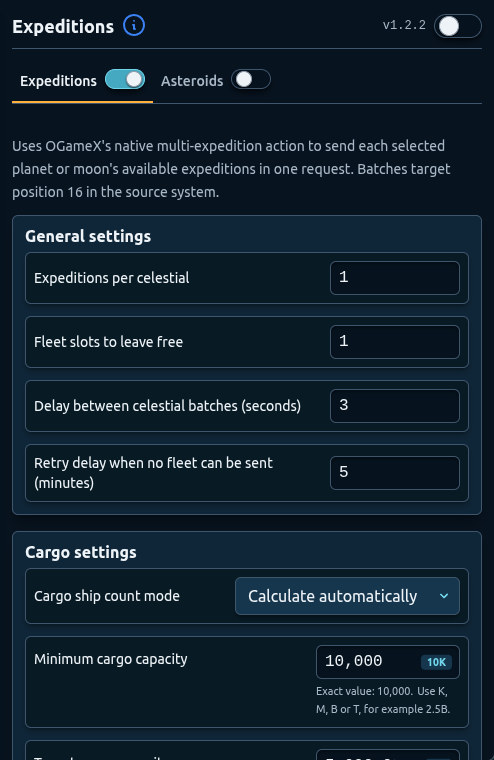
Enable only the modules you need, then choose celestials, priorities, targets, fleet rules, resource limits, and timing for each routine.
Coordinate building, research, bank movement, farming, expeditions, and utility tasks through one OGameX extension.
Review scan progress, next-run timers, queues, current targets, and configuration before expanding your setup.
Enable one module first, confirm its selected celestial, targets, limits, and task results, then add more automation gradually.
Choose scheduled or dynamic pauses for the hours when you do not want automation to act. Pauses cannot guarantee account safety.
OGameX Helper Bot is independent and is not an official OGameX or Gameforge product. Review the game rules before using automation.
Activate access, configure safety controls, complete discovery, and prepare a small first module.
Read guideCreate real downtime and prepare selected planets and moons before a scheduled pause.
Read guideStart in observation mode, configure protected celestials, and review evacuation plans.
Read guideChoose origins, system range, cargo capacity, fleet composition, and retry timing.
Read guideSet standard planet and moon building targets, priority order, energy, and storage safeguards.
Read guideConfigure target filters, reports, fleet reserves, attack intervals, and priority targets.
Read guideIt includes configurable modules for defender responses, pause fleet evacuation, expeditions, inactive farming, building, research, bank movement, auctions, universe scanning, and supported daily utilities.
The one-month OGameX license is €4.50 before applicable taxes. This includes a 10% discount from the €5.00 base price. Other durations and current prices are shown at checkout.
Yes. Each main automation feature has its own control, so you can begin with one routine and enable additional modules only when their settings are ready.
Install the extension from the Chrome Web Store, sign in to Helper Bot, and activate an OGameX license key.
No. OGameX Helper Bot is an independent browser extension and is not an official OGameX or Gameforge product.