
Guide
OGameX Expeditions
The Expeditions feature sends fleets to position 16 from selected planets and moons. You control the system range, number of expeditions per celestial, launch delay, retry timing, cargo mode, and fleet composition. Start with one celestial and one expedition so the first cycle is easy to verify.
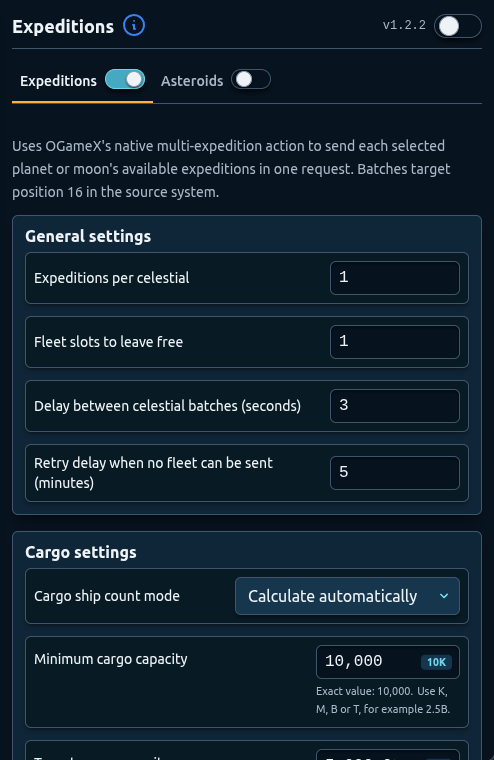
Development preview captured on 25 September 2026 from local build 1.2.2. The public Chrome Web Store release was 1.2.2 when checked that day; its controls may differ.
Overview
OGameX Expeditions chooses a system uniformly at random inside the configured range around each source. It does not use smart system scoring. A range of zero sends to position 16 in the source system. Targets are kept within systems 1 through 499.
The feature needs its sidebar toggle, the main bot, selected celestials, and a usable fleet configuration. An empty celestial selection sends nothing. Fleet slots, ships, fuel, cargo, active pauses, and current movements can all cause a wait or retry.
Configure the pause scheduler first and review shared account setup in the OGameX overview.
General Settings
Random system range defines how far above or below the source system a target can be selected. Begin with a narrow range. Wider ranges can increase travel time and fuel use and may make return timing less predictable.
Expeditions per celestial controls how many expedition flights each selected planet or moon can launch during the routine. A high value multiplied across many celestials can consume most available fleet slots. Reserve capacity for Defender, Bank, farming, and ordinary account actions.
Delay between expeditions spaces launches within a batch. Avoid setting it to the shortest value simply to send fleets quickly. A practical delay makes the first cycle easier to follow and reduces simultaneous changes.
Retry delay when no fleet can be sent controls how long the feature waits when current conditions prevent a launch. This is a normal state when ships are returning, slots are occupied, or resources are insufficient.
Use Run now after correcting a setting to request another check. It cannot create ships, free a fleet slot, or make an invalid configuration launchable.
Cargo Mode
Calculate automatically lets the feature choose enough configured Small Cargo or Large Cargo ships to reach the target cargo capacity. Set Minimum cargo capacity so an undersized fleet is not sent and Target cargo capacity for the desired capacity.
Automatic mode only adjusts configured cargo ship types. Other ship types keep the exact quantities entered in the fleet configuration.
Manual ship quantities uses the entered amounts directly. In manual mode, confirm that the resulting cargo capacity meets your account plan. A manually configured fleet with no usable ships cannot launch.
Start conservatively. Cargo requirements, ship speed, fuel, and availability can differ between origins. A composition that works on one planet may wait on another.
Select Planets and Moons
The Celestials section lists detected planets and moons with names and coordinates. Use Select all only after testing individual origins. Deselect all provides a quick way to stop new expedition sources without deleting the fleet configuration.
If no celestials appear, enable Expeditions, start the bot once, and let account discovery finish. Return to the feature and select the intended origins. Check the coordinates carefully when names are similar.
An empty selection is valid but produces no launches. If the feature repeatedly waits, confirm at least one available celestial is selected.
Fleet Configuration
Add ship types from the selector. Cargo ships can be automatic or assigned a fixed quantity depending on cargo mode. Other added ships use their entered quantities.
Remove a ship type when it should not be part of the expedition fleet. A zero quantity should not be treated as a meaningful fleet choice. Review composition after importing settings from another account because available ships may differ.
The interface uses the ship names available to the current account. Choose a fleet that you can supply consistently without taking every ship needed for protection or resource movement.
Coordination with Other Features
Expeditions competes for fleet slots with Defender, Pause Fleet Save, Bank, and inactive farming. Leave enough slots free for safety and resource routines. If a pause is approaching, avoid increasing the batch size; unfinished flights may conflict with the intended offline plan.
Main Fleet does not automatically become an expedition origin. Expeditions uses its own selected celestial list. Universe Scan is also separate and continues according to its own schedule.
Use scheduled or dynamic downtime when you do not want expeditions sent. Expedition timing settings change when actions run but cannot guarantee account safety.
Recommended Setup
- Configure pauses and reserve fleet slots for protection.
- Select one planet or moon.
- Set expeditions per celestial to one.
- Use a narrow random system range.
- Add one cargo type in automatic mode.
- Set realistic minimum and target cargo capacity.
- Add a visible delay between launches and a reasonable retry delay.
- Watch the first launch, return, and next-action timer.
- Add more origins or flights gradually.
Troubleshooting
- No expedition launches: select at least one celestial and add usable ships.
- Automatic cargo waits: confirm the origin has a configured cargo type and enough ships to meet minimum capacity.
- Only some celestials launch: check ship availability, fuel, fleet slots, and each origin’s selection.
- Targets are farther than expected: reduce the random system range.
- The feature waits near a pause: let the pause finish or reduce the batch so flights fit the active period.
FAQ
Does OGameX Expeditions select the best system?
No. It chooses uniformly at random within the configured range around each selected source.
What does a system range of zero do?
It sends the expedition to position 16 in the same system as the source celestial.
Can planets and moons both launch expeditions?
Yes. Select any detected planets or moons that should be used as origins.
What does automatic cargo mode change?
It calculates configured cargo-ship quantities toward the target capacity; other ship types keep their entered amounts.
Why should I keep fleet slots free?
Defender, Bank, Pause Fleet Save, inactive farming, and ordinary account actions may need them.