One Month
Total before tax
€4.50 per month equivalent
- Starts on purchase date.
- Instant key delivery after payment
Save €0.50
Choose One Month
Send expeditions from your OGame tab and plan a fleetsave for your next break.
If you keep your expedition ships on a moon, you can use it as your only launch site. While the fleet is out, your colonies can keep working through their building queues.
Free to install. Eligible game accounts can request a three-day trial key from the extension license panel. One month of paid access costs €4.50 before tax.
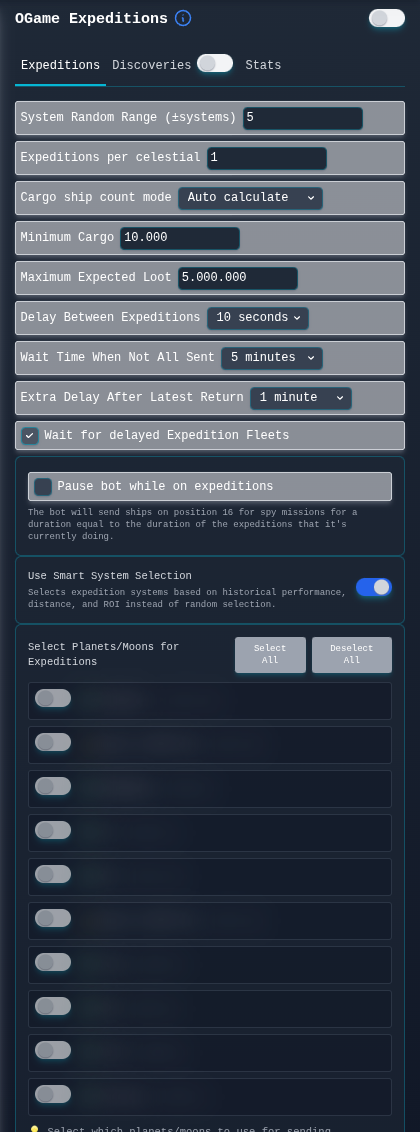
In Expeditions, select one moon with ships and fuel. Set Expeditions per celestial to one, choose Auto calculate for cargo and start the module. Look for the outbound flight in OGame’s fleet movements. When the expedition report arrives, open Expeditions → Stats and find the same system in your history to compare the rewards.
Each plan includes all features for the period you choose.
Total before tax
€4.50 per month equivalent
Save €0.50
Choose One MonthTotal before tax
€3.75 per month equivalent
Save €3.75
Choose Three MonthsTotal before tax
€2.75 per month equivalent
Save €27.00
Choose One YearYou can choose other license durations at checkout.
If an expedition runs late, you can have the next wave wait for those ships to return. Discoveries has its own limit on how many missions to send at once.
For a planned break, choose a mission and destination for the ships on each moon. Defender has separate controls for moving a fleet when an attack is on its way.
Give each colony its own building priorities and choose which Research Lab handles standard research. Lifeform upgrades have their own targets on each planet.
Let Bank send cargo to a planet that needs resources for an upgrade. At the shipyard you can request a batch of probes or set a target for the defenses you want to keep there.
Choose a planet or moon to scan from and the minimum haul worth a trip. You can send another probe to a target before committing your cargo ships.
Choose which resource to spend and set a ceiling for each item rarity. Add an alliance mate to the whitelist to skip the auction while they hold the highest bid.
Set aside a slot if you want to send another fleet while cargo ships are out.
Check the destination, fuel and flight time against your next scheduled pause.
Refresh the building levels, then move the mine you want to upgrade up the list.
Open the Bank queue to see which transfers are still waiting and which are in flight.
Choose how close to impact the ships should leave and when Defender should try to recall them.
In automatic cargo mode, check Minimum Cargo. The ships on the selected moon need enough capacity to meet that number. If they do, check the fuel and whether Expeditions is waiting for a delayed fleet to return.
The daily total counts reports in which you found ships. Five Small Cargo ships in one expedition report count as one discovery. The entry in Recent History shows the ship type and quantity.
Set Min Bank Deuterium on the Bank tab. That reserves fuel at the source when Bank sends resources for an upgrade.
Helper Bot is an independent extension for desktop Chrome. Gameforge publishes OGame and sets the rules for using scripts on its servers.