
Guide
OGameX Pause Scheduler
The Pause Scheduler creates real downtime in an OGameX Helper Bot routine. It supports daily scheduled windows, overnight pauses, small random offsets, a preparation period, and dynamic pauses based on active runtime. Configure it before leaving repeated tasks enabled.
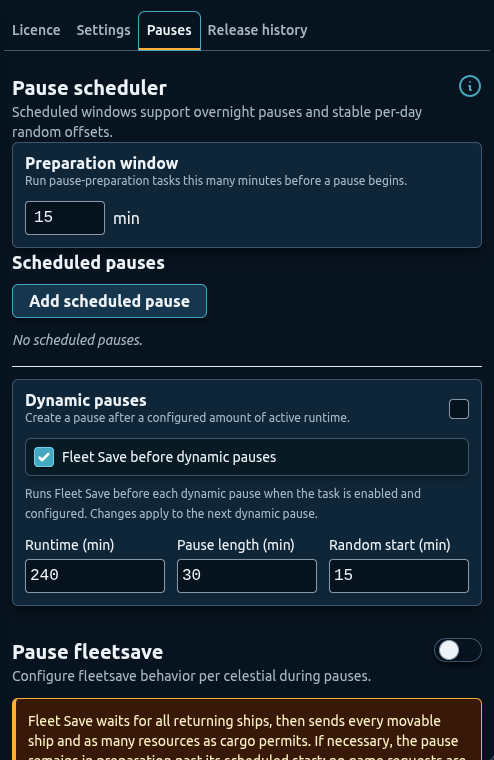
Development preview captured on 25 September 2026 from local build 1.2.2. The public Chrome Web Store release was 1.2.2 when checked that day; its controls may differ.
Overview
Set a pause schedule that fits your own use and the game rules. Pauses stop configured automation during those periods, but they cannot guarantee account safety.
When the bot is fully paused, normal game routines do not continue. Defender live observation is also suspended, so do not rely on Defender to protect an account throughout an offline window. Use the preparation window and Pause Fleet Save when ships or resources need to be moved before the pause.
Preparation Window
The Preparation window is measured in minutes before a scheduled pause begins. It gives pause-preparation routines time to act while the bot can still make normal game actions.
Choose enough preparation time for the number of celestials you protect and the transfers they require. A configuration that consolidates several planets into moons or Main Fleet needs more time than a single direct fleetsave. Do not set the preparation window so late that transfers cannot complete before the pause.
The general preparation value and Pause Fleet Save’s own preparation choices should describe one practical sequence. Review expected flight and processing time after changing origins or adding new planets.
Scheduled Pauses
Select Add scheduled pause to create a daily window. Choose the starting and ending hour, then optionally add random start and end minutes. Each saved window can be enabled, disabled, edited, or deleted independently.
The hour values use a 24-hour day. A window from an earlier hour to a later hour occurs within the same day. When the ending hour is earlier than or equal to the starting hour, the scheduler treats the pause as overnight. For example, a window beginning late in the evening and ending the next morning should be saved as an overnight pause.
Random start and end values add a stable per-day offset inside the selected range. They help avoid an identical clock boundary every day while keeping the pause near the intended schedule. Keep these offsets small enough that they do not erase the downtime you planned.
Each saved row shows the calculated next start and end once the bot is running. Verify those values after editing the schedule, especially around overnight windows and local clock changes.
Dynamic Pauses
Dynamic pauses are based on active runtime rather than a fixed time of day. Configure:
- Runtime for how long the bot may be active before creating a pause.
- Pause length for the base downtime.
- Random minutes for additional timing variation.
Dynamic pauses complement a daily offline window. They are useful when the bot starts at different times and you still want breaks within the active period. They should not be used to stretch automation across most of the day. Check the total active time shown by your schedule before enabling automation.
If both scheduled and dynamic pauses apply, expect the bot to honor downtime rather than immediately resuming every queued routine. Review the status after a long scheduled pause because a dynamic cycle may also have changed.
How Pauses Affect Features
Normal building, research, expedition, Auction, Bank, farming, scanning, and utility actions wait until the bot resumes. A Bank transfer or fleet action that cannot safely begin near a pause may report that it is waiting.
Pause Fleet Save runs during preparation and coordinates configured fleet movement. Once fully paused, it does not keep sending new game actions. Defender can contribute during pause preparation, but live attack scanning is not a substitute for a prepared offline fleet plan.
Use Defender in observation mode before live evacuation, and test Pause Fleet Save during a supervised pause before relying on the combination.
Recommended Setup
- Decide when you want the bot stopped each day and set a daily offline period.
- Add one scheduled pause and verify whether it should run overnight.
- Add small random start and end offsets.
- Set a preparation window long enough for configured fleet movements.
- Enable a moderate dynamic pause after several hours of active runtime.
- Configure Pause Fleet Save for each important planet and moon.
- Supervise the first preparation, pause, and resume cycle.
- Check the next calculated pause times the following day.
Troubleshooting
- An overnight pause looks reversed: an end hour earlier than the start hour intentionally continues into the next day.
- A pause begins before fleet preparation finishes: increase preparation time, simplify transfers, or start the scheduled window later.
- The bot does not resume when expected: check both scheduled and dynamic pause state and confirm the displayed next window.
- A normal task reports waiting for pause: let the offline period finish rather than forcing a new fleet or Bank action.
- Defender stops checking attacks: this is expected during the fully paused period; configure pre-pause fleet protection.
FAQ
Can I create more than one scheduled pause?
Yes. Each saved window has its own active control and calculated next start and end time.
How do overnight pauses work?
Choose a start hour later than the end hour. The scheduler treats the end as occurring on the following day.
What does the random offset change?
It shifts the daily start or end within the selected minute range while keeping the pause near the hours you configured.
Do features continue running while paused?
No. Normal game automation waits. Preparation routines must complete before the bot enters the fully paused period.
Do pauses guarantee account safety?
No. They stop configured automation during downtime, but they cannot guarantee account safety or prevent enforcement action.