
Guide
Ikariam Piracy Automation Guide
The Piracy feature runs capture missions from an eligible Pirate Fortress. It validates the current fortress level, filters unsupported mission tiers, follows the server’s mission duration, and can optionally prepare a mission before a scheduled bot pause.
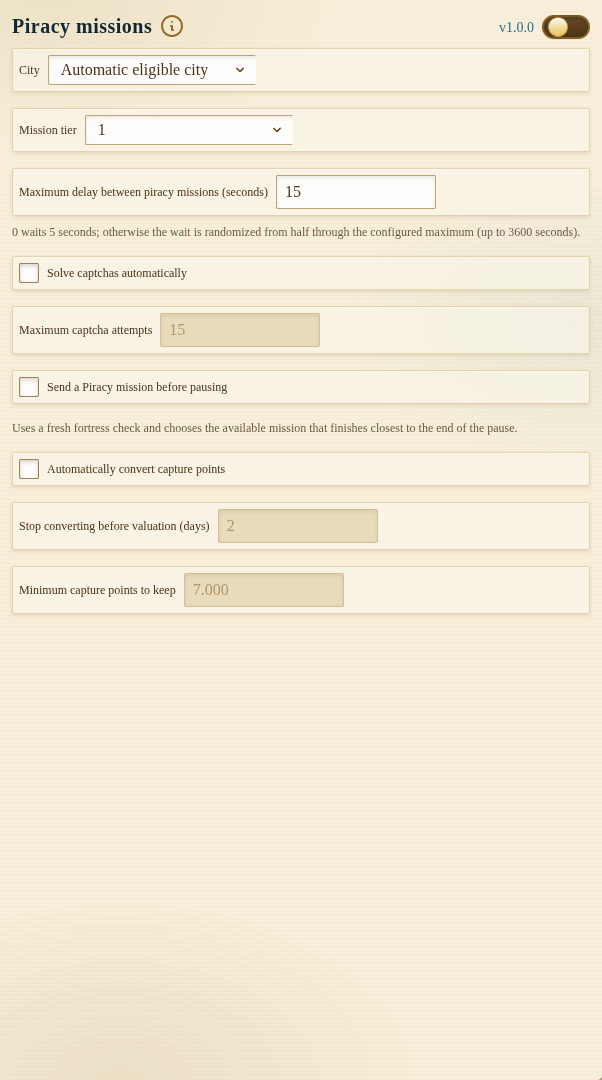
Development preview captured on 25 September 2026 from local build 1.0.0 with the module off. The public Chrome Web Store release was 1.0.0 when checked that day; its controls may differ.
Enable the Piracy master toggle only after reviewing the selected city, mission, delay, captcha behavior, and capture-point conversion settings.
Eligible City and Mission Selection
Choose a specific city or leave the city selector on Automatic eligible city. Automatic mode refreshes known cities and selects one with a Pirate Fortress at level 1 or above. A manually selected city is still validated; the task will not send a mission from a missing or level-zero fortress.
The mission list is filtered against the highest relevant fortress level. Mission tiers require fortress levels 1, 3, 5, 7, 9, 11, 13, 15, and 17. If a saved tier is no longer eligible, the panel moves it to the highest available eligible mission.
Mission Timing
After the server accepts a mission, the next check is based on the mission duration returned by Ikariam plus the configured execution delay.
The default maximum delay is 15 seconds. A positive value produces a randomized delay between half of the configured maximum and the maximum. Setting the value to zero uses a short five-second delay rather than sending requests continuously.
If a mission is already running, the task reads its remaining time and schedules the next check from that state.
Captcha Handling
When Ikariam presents a piracy captcha, the extension marks Piracy as pending and stops normal mission processing. If automatic solving is enabled, the image is sent through the configured Helper Bot backend solver.
The number of solve attempts can be set from 1 to 20. The default is 15. If all attempts fail, the pending warning remains visible and a piracy notification can be sent.
Use Clear captcha flag only after the challenge has actually been resolved in Ikariam. Clearing local state does not solve or bypass the game challenge.
Piracy Before a Scheduled Pause
Enable Send piracy before pause to add Piracy to the pause-preparation flow. Before the bot enters a scheduled pause, it checks eligible cities and server-advertised missions, then chooses the eligible mission whose duration is closest to the remaining pause period.
The selection respects fortress requirements and avoids starting another mission when one is already in progress. Each pause window is handled once.
Automatic Capture-Point Conversion
Automatic conversion can turn spendable capture points into crew strength after a successful mission. The planner is intentionally conservative:
- it always protects at least 7,000 capture points;
- it skips conversion when another conversion is running;
- it skips when required server state is unavailable;
- it spends only whole conversion units; and
- it stops converting near the piracy valuation window.
Choose how many days before valuation conversion should stop. The accepted range is 1–21 days and the default is 2 days. When the remaining event time is inside that window, capture missions may continue but automatic conversion is skipped.
Capture-point conversion is irreversible. Keep it disabled until the reserve and valuation settings match your strategy.
Common Reasons a Mission Does Not Start
- No city has an eligible Pirate Fortress.
- The selected mission requires a higher fortress level.
- Another piracy mission is already active.
- A captcha is pending.
- The selected city or fortress data could not be refreshed.
- The server response was ambiguous or rejected.
- The Next check timer has not expired.
Recommended Setup
- Start with one known Pirate Fortress city.
- Select the lowest eligible mission and keep the default delay.
- Verify one complete mission cycle.
- Enable automatic city selection only after city data is current.
- Test captcha delivery before depending on automatic solving.
- Enable conversion last and confirm the 7,000-point reserve.
For browser and Telegram piracy alerts, see Notifications. Other daily city routines are documented in Cities.
FAQ
Can Piracy automatically choose a city?
Yes. Leaving the city field on Automatic makes the task choose a refreshed city with an eligible Pirate Fortress. Mission tiers are still filtered by fortress level.
How many capture points are protected?
Automatic conversion always leaves at least 7,000 capture points unspent and converts only complete crew-strength units above that reserve.
Which mission runs before a pause?
The task compares the remaining pause duration with the durations of missions supported by the available fortress level and chooses the closest eligible match.