Guide
Ikariam Barbarian Farming Guide
The Barbarians feature supports two separate workflows: a configurable manual battle plan and an automatic grind that chooses a conservative preset for the detected barbarian level. Both require the Barbarians master toggle and their own subtab switch.
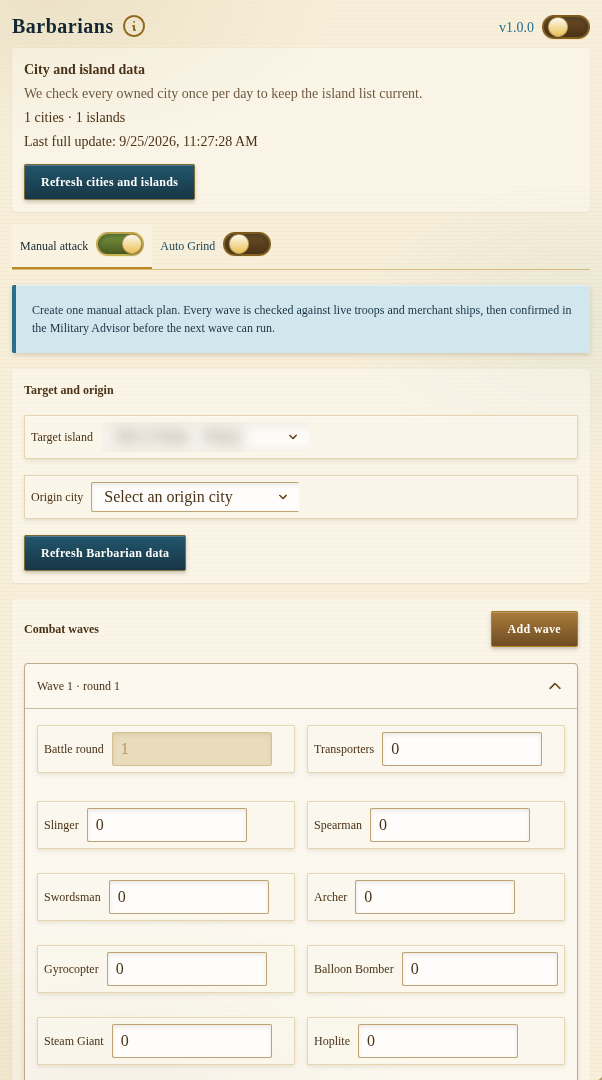
Development preview captured on 25 September 2026 from local build 1.0.0 with the module off. Island name and coordinates are blurred; no attack was queued. The public Chrome Web Store release was 1.0.0 when checked that day; its controls may differ.
The origin city and barbarian target must be on the same island. The extension validates this before starting, so selecting a city from another island will not send the attack.
Inspect the Barbarian Village
Choose an owned island, select an origin city, and use Refresh Barbarian data. The target panel can show:
- village availability;
- current level;
- gold and resource loot;
- known defenders; and
- an active cooldown.
Refresh before creating a plan because village level, defenders, cooldowns, troops, and transporter availability can change.
Manual Attack Waves
Manual mode lets you build one or more waves. Each wave contains a battle round, transporter count, and land-unit loadout. The first wave starts in round 1; later waves can be assigned to later rounds.
Before sending anything, the task performs a preflight check against the origin city. It verifies the target, available units, transporter capacity, travel data, and the requested wave totals. The plan then advances through travel, battle, wave confirmation, optional looting, return, completion, or a reported failure.
Use the optional loot configuration when you want a separate loadout after the village is destroyed. Reserve transporters keeps the configured number out of the loot shipment.
Automatic Grind
Auto Grind repeatedly inspects the village and selects the preset matching its current level. It automatically coordinates the same manual-wave engine, waits for movements and cooldowns, handles return timing, and continues until cancelled or an unsupported state is reached.
Levels outside 1–39 stop explicitly. Auto Grind does not invent a loadout for unknown higher levels.
Troops Required by Level
The automatic presets are conservative fixed requirements. Keep at least these units available in the selected origin city:
| Barbarian level | Attack wave | Loot units |
|---|---|---|
| 1–9 | 90 Swordsmen, 21 Sulphur Carabineers | 1 Swordsman |
| 10–19 | 60 Swordsmen, 35 Sulphur Carabineers, 12 Mortars, 50 Steam Giants | 12 Mortars, 50 Steam Giants |
| 20–29 | 60 Swordsmen, 70 Sulphur Carabineers, 12 Mortars, 12 Battering Rams, 100 Steam Giants, 30 Balloon Bombers, 5 Cooks | 12 Mortars, 100 Steam Giants |
| 30–39 | 300 Swordsmen, 147 Sulphur Carabineers, 24 Mortars, 18 Battering Rams, 300 Steam Giants, 5 Cooks, 10 Doctors | 24 Mortars, 150 Steam Giants |
These values are availability requirements, not a guarantee of a particular combat outcome. Ikariam combat conditions and your live account state remain authoritative.
City Selection and Common Blocks
Manual and automatic modes use the selected origin city even when another city is visible. An action can still be blocked when:
- the origin city is not on the target island;
- the village is already under attack or cooling down;
- troops are scattered or still returning;
- required units or transporters are unavailable;
- the village level has no supported preset; or
- an active plan already owns the workflow.
The status panel shows the current phase, level, completed cycles, and the latest error when available. Cancelling Auto Grind also cancels the active generated manual plan and clears its schedule.
Recommended Setup
- Refresh the target and confirm its level.
- Select a city on that same island.
- Compare available troops with the level table.
- Test one manual plan before enabling Auto Grind.
- Keep additional transporters available when loot should be collected.
- Review status after every level increase.
Use Military to train the required troops and Islands to scan targets or configure inactive-player farming.
FAQ
Why does Auto Grind say the selected city is not eligible?
The origin city must be on the same island as the selected barbarian village. Select a city from that island and refresh the target again.
Does Auto Grind calculate a new army for every fight?
No. It chooses one of four maintained presets for levels 1–39 and validates that the required units are available before proceeding.
What happens when the army is returning or scattered?
The task waits and schedules another check from the known movement or recovery state. It does not immediately create another attack while the required force is unavailable.