
Guide
OGameX Bank
Bank supplies resources from a selected Bank celestial to configured building and research targets. It also includes an independent Daily Collection routine that sends excess resources from enabled planets toward the Bank, plus a Queue for reviewing requests and flights.
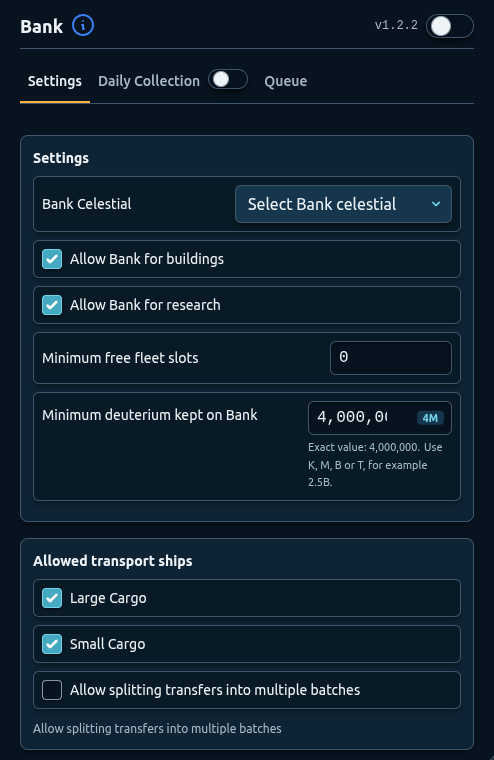
Development preview captured on 25 September 2026 from local build 1.2.2. The public Chrome Web Store release was 1.2.2 when checked that day; its controls may differ.
Overview
Bank has three subtabs: Settings, Daily Collection, and Queue. The sidebar toggle is the main control for the Bank feature. Daily Collection also has its own subtab toggle because collecting planet surplus is optional even when ordinary Bank delivery is enabled.
Bank works with Auto Build and Auto Research. Those features identify a resource requirement, and Bank can create a request when the matching support policy is allowed. The request waits until ships, fleet slots, fuel, resources, pause timing, and route conditions permit delivery.
Use the Bank Queue guide to follow each request from its reason through arrival and ship return.
Start with one target and one transfer. A Bank configuration can move large resources and consume fleet capacity across the account, so avoid enabling it with many high building and research targets immediately.
Select the Bank Celestial
Choose Bank Celestial from detected planets and moons or select the shared Main Fleet option. This location is the source for ordinary building and research deliveries and the destination for Daily Collection.
Pick a location with appropriate cargo ships, enough deuterium for routes, and resources beyond the configured reserve. Check the displayed coordinates carefully. If a selected source later disappears, choose an available replacement before restarting Bank.
Main Fleet can change after a deploy-style Pause Fleet Save. If Bank uses Main Fleet, verify the shared selection after every deploy-based pause plan. See Universe Scan and Main Fleet.
Building and Research Policies
Allow Bank for buildings lets Auto Build requirements create delivery requests. Allow Bank for research does the same for Auto Research.
Enable one policy at first. Use a small target on one destination and confirm that the Queue explains the correct reason, target, level, and required resources.
Disabling a policy prevents new support for that category. Review existing requests in the Queue separately; changing the policy should not be assumed to cancel a transfer already sent.
Fleet Slot and Fuel Reserves
Minimum free fleet slots tells Bank how many slots should remain available instead of being used for delivery. Reserve slots for Defender, Pause Fleet Save, expeditions, inactive farming, and ordinary play.
Minimum deuterium kept on Bank protects a base deuterium amount at the source. Flight fuel is also needed. A request can wait when sending it would reduce the source below the reserve or leave insufficient fuel.
Do not lower these safeguards merely to clear a waiting request. Check the broader fleet and protection plan first.
Allowed Transport Ships
Choose whether Large Cargo and Small Cargo ships may be used. Bank builds a transfer from available allowed ships. If neither type is available or enabled, requests wait for ships.
Large Cargo often moves more with fewer ships, while Small Cargo can help when the preferred type is unavailable. The best choice depends on the current account and route. Keep enough ships outside Bank for other fleet routines.
Allow splitting transfers into multiple batches permits a requirement to be delivered over more than one flight when one batch cannot carry everything. This can consume additional fleet slots and extend the time before a target is fully funded. Leave it off for the first test unless partial deliveries are deliberate.
Next Check and Run Now
The Settings subtab shows the next Bank check when scheduled. Run now asks Bank to reconsider waiting requests. It cannot bypass a pause, missing fleet slot, unavailable ship, insufficient resources, reserve, or flight fuel.
Use Run now after fixing the underlying setting. Repeatedly clearing the timer without changing conditions makes the status harder to interpret.
How Bank Works with Automation Targets
Auto Build and Auto Research can wait for resources while a Bank request is active. The Queue shows remaining resources, in-transit amounts, delivered amounts, expected arrival, and return.
After resources arrive, the dependent automation can reconsider its target. Arrival does not guarantee construction or research will start immediately; queues, prerequisites, and pause state still apply.
Keep building and research priority lists short. A large set of unaffordable targets can create competing demand and make it difficult to understand which request should be served first.
Pause Behavior
Bank waits when a transfer should not begin near or during a pause. Do not force a fleet launch to avoid a normal waiting-for-pause result. Let the offline period finish and review the queue after the bot resumes.
Preserve downtime when you do not want Bank tasks to run. Bank scheduling cannot guarantee account safety and should not be used to keep the account active continuously.
Recommended Setup
- Select one stable Bank celestial.
- Enable only building or research support for the first test.
- Reserve at least one fleet slot.
- Set a realistic minimum Bank deuterium amount.
- Allow one cargo type known to be available.
- Leave multiple batches off initially.
- Create one small Auto Build or Auto Research requirement.
- Review the complete request, flight, arrival, and target result.
Troubleshooting
- Bank has no source options: allow celestial discovery to finish and select an available location.
- Waiting for fleet slot: reduce other fleet activity or increase the number of slots Bank must leave free rather than forcing a launch.
- Waiting for ships: enable an available cargo type or return cargo ships to the Bank source.
- Waiting for resources: compare the requirement with current stock and the protected deuterium reserve.
- Waiting for pause: allow downtime to complete.
- The target still waits after arrival: check its own queue, prerequisites, current resources, and enabled target.
FAQ
What can ordinary Bank delivery support?
It can supply configured Auto Build and Auto Research requirements when their matching policies are enabled.
Can Bank use Main Fleet as its source?
Yes. Verify Main Fleet after any deploy-style pause movement because that shared selection can change.
Why should Bank keep fleet slots free?
Defender, Pause Fleet Save, expeditions, inactive farming, and ordinary account actions may need them.
What does multiple batches do?
It allows one requirement to be split across several flights when a single transfer cannot carry the full amount.
Does resource arrival guarantee the upgrade starts?
No. The destination feature still checks its own queue, prerequisites, target, pause state, and current conditions.