
Guide
Settings Tab
Last updated: 2026-07-281 min read
⚙️ Settings Tab
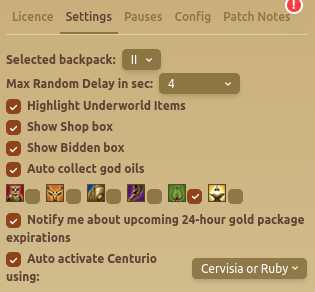
The Settings Tab allows users to customize game automation settings and notifications.
🎒 Inventory & Item Settings
- Selected Backpack: Choose which backpack slot the script should use.
- Max Random Delay (in sec): Set the upper limit for randomized delays before supported actions.
🔍 Item Visibility Options
- Highlight Underworld Items: Marks special items from the Underworld.
- Show Shop Box: Displays items in the shop.
- Show Bidden Box: Reveals Bidden items.
- Auto Collect God Oils: Automatically picks up god oils when available.
🔔 Notifications & Automation
- Notify About Expiring Gold Packages: Alerts when gold packages will expire within 24 hours.
- Auto Activate Centurio: Automatically activates Centurio using Cervisia or Ruby.
📌 Tip: Start with a short delay range, then confirm that time-sensitive modules still behave as expected before increasing it.
FAQ
How does the maximum random delay work?
The value sets an upper bound rather than one fixed wait. Supported actions choose a delay within the configured range, so increasing it can make a complete routine take longer.