Gladiatus Helper Bot

Guide

Gladiatus Helper Bot License and Activation
Last updated: 2026-09-252 min read

Gladiatus Helper Bot License and Activation

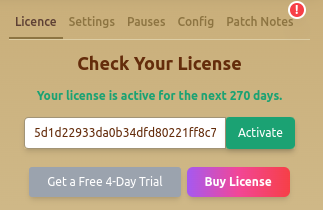
The General → Licence tab shows your license status, remaining time, an activation field, and trial or purchase actions when available. This workflow was checked against extension version 2.4.6 on 25 September 2026. A previous illustration has been removed because it displayed a real license key.

Before You Start

Install the Gladiatus Chrome extension, open the character that should use the license, and sign in to your Helper Bot account. An installation is free; automation needs a valid license or an eligible trial. Do not share a license key in support messages or screenshots.

Gladiatus is operated by Gameforge, whose game rules restrict bots, macros, and other automated scripts used for an advantage. Read the rules for your server before deciding whether to use automation.

Activate and Check Access

  1. Open the extension panel on the intended Gladiatus character, then open General → Licence.
  2. Check the current status and remaining days before entering another key. If you are eligible, use the trial action in this tab; eligibility is checked for the game account.
  3. If you have an unused key for this game, paste it into the activation field and select Activate. Keep the key out of screenshots.
  4. Confirm that the tab shows active access and the expected remaining time. Then configure one module with its switch off, review its limits, and enable it only when ready.

If you already have an active license, pressing Activate can return the current license rather than add time. To extend access, use the dashboard's Extend action with an eligible unused paid key and check the resulting end date.

If Activation Does Not Complete

Confirm that you are signed in to the intended character and Helper Bot account, that the key belongs to Gladiatus, and that the browser can reach the Helper Bot service. Reload the game once and recheck the Licence tab. If the key was used already or the account association is unclear, contact support with your account email, game, browser, extension version, and the error text. Do not send the key itself.

Current Prices and Offers

License periods and discounts can change. The Gladiatus product page shows the current popular plans, and the checkout page shows all available durations and the final amount before payment. Installing the Chrome extension itself is free; automation requires an active license. Eligible game accounts can request a trial from the extension license panel.

Quick Actions

  • Buy Now: Redirects to the purchasing page.
  • See What Others Think: Links to user reviews.
  • Contact Support: Email gladiatushelperbot@gmail.com with your account email, game, browser, extension version, and error text. Never include your key.

Activate on the intended Gladiatus character. Keys are associated with a player, and account reset or move rules appear in the dashboard. Do not assume one key covers multiple characters at the same time.