Gladiatus Helper Bot

Guide

Config Tab
Last updated: 2026-08-031 min read

Config Tab

Config Tab

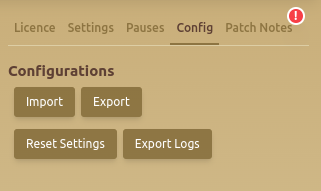
The Config tab manages complete Helper Bot configuration files and diagnostic logs. Use it when you want to back up a working setup, move settings to another browser installation, return all modules to their defaults, or collect logs for a support request.

Configuration Options

  • Import Settings: Load a configuration file that was previously exported from Helper Bot.
  • Export Settings: Download the current configuration as a backup or for transfer to another installation.
  • Reset Settings: Restore the extension settings to their default values.
  • Export Logs: Download recent diagnostic logs for troubleshooting.
  1. Open the Config tab before making a large group of changes.
  2. Select Export Settings and keep the downloaded backup in a location you can identify later.
  3. Change one module or related group of settings at a time.
  4. Run a short test and confirm the result before changing another module.
  5. If the new setup does not work as expected, import the backup and test again.

Importing Settings Safely

Import only a file that was created by the Helper Bot export action. After an import, review account-specific values such as targets, thresholds, schedules, and enabled modules before starting automation. A configuration that worked for another character or server might not match the resources and limits of the current account.

Reset and Log Troubleshooting

  • Export the current settings before selecting Reset Settings so the previous setup is recoverable.
  • Use a reset when you need to compare a problem against the default configuration.
  • Reproduce the problem once before exporting logs so the relevant action is included.
  • When contacting support, include the game, browser, extension version, affected module, and a short sequence of actions alongside the exported logs.