
Guide
🔧 Repair Items - Repair Items
Overview
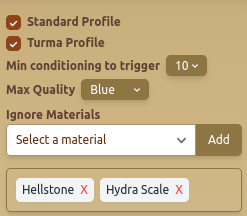
The Repair Items - Repair Items tab allows users to automate item repairs based on selected profiles, quality filters, and material preferences.
Features
🔄 Profile & Repair Settings
- Standard Profile – Enables automatic repairs using the standard profile.
- Turma Profile – Uses the Turma profile for repairing gear.
🛠️ Repair Conditions
- Min Conditioning to Trigger – Specifies the durability percentage at which repairs are initiated.
- Max Quality – Defines the highest item quality to repair (Blue, Purple, etc.).
🚫 Ignore Materials
- Ignore Specific Materials – Prevents certain materials from being used in repairs.
- Add & Remove Materials – Allows manual selection of materials to exclude from repair.
Best Practices
- ✅ Set Min Conditioning to avoid unnecessary repairs and optimize durability usage.
- ✅ Use Ignore Materials for rare materials like Hellstone or Hydra Scale.
- ✅ Ensure Max Quality is set appropriately to focus on valuable items.
FAQ
What is Repair Items - Repair Items?
The Repair Items - Repair Items tab allows users to automate item repairs based on selected profiles, quality filters, and material preferences.
What are the key features of Repair Items - Repair Items?
Key features include: Standard Profile – Enables automatic repairs using the standard profile.; Turma Profile – Uses the Turma profile for repairing gear.; Min Conditioning to Trigger – Specifies the durability percentage at which repairs are initiated.
What are recommended settings for Repair Items - Repair Items?
Set Min Conditioning to avoid unnecessary repairs and optimize durability usage. Use Ignore Materials for rare materials like Hellstone or Hydra Scale. Ensure Max Quality is set appropriately to focus on valuable items.