
Guide
Gladiatus Hide Gold Guide
Hide Gold uses a Primary rule to spend gold above the amount you keep as pocket money. An optional Backup rule can try another route when the primary one cannot be used. This guide describes the controls in extension version 2.4.6, reviewed on 25 September 2026. Review the live game and your settings before enabling any purchase routine.
Before You Enable It
- Install Gladiatus Helper Bot, open your character, and activate a valid license or eligible trial.
- Decide how much gold must remain available for healing, training, or planned purchases.
- Check whether the selected guild market, public market, auction, or training route is usable for this character. Availability and prices can change.
Configure the Primary Rule
- Open Hide Gold → Primary and leave the feature disabled while you set its limits.
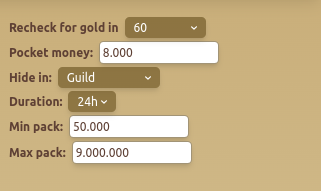
- Set Pocket money to the amount you want to keep. For example, if you need 10,000 gold for routine play, enter 10,000; this is a configuration example, not a recommended amount for every account.
- Choose Hide in. The available controls depend on the selected route. Guild and public market routes also expose duration, buying speed, filter, seller and soul-bound name lists; auction exposes item-type and minimum-price controls; training exposes a stat choice.
- Set Min pack and Max pack to bound eligible purchases. Check that the maximum cannot consume gold reserved for a planned action.
- Set Recheck for gold to choose how often the module may check again. A next-check countdown appears when a future check is scheduled.
- Review the route-specific filters and only then enable the Hide Gold feature. Watch its first eligible check before leaving it unattended.
The screenshot shows a prior primary-settings layout; some route-specific controls appear only after you select that route.
Add a Backup Only If Needed
The Backup tab has its own switch, destination, and minimum-gold threshold. Keep it off until the primary rule behaves as intended. If enabled, choose a different route, check its pack duration and filters, and avoid contradictory seller or item settings. The primary and backup rules share some route-specific options, so review both tabs after changing a shared filter.
Expected Behavior and Troubleshooting
The module checks its current schedule, pocket-money reserve, selected route, pack limits, and available game offers before a purchase. A configured route does not guarantee that a suitable pack exists. If nothing happens, check whether Hide Gold and the bot are enabled, whether the next-check timer is due, whether sufficient gold remains above pocket money, and whether the chosen market or auction has eligible items. Review any error shown in the tab before widening limits.
Buying packs spends game gold and can fail when offers disappear or game state changes. Start with narrow limits and inspect the first result. For related pack handling, see Packages and Gold Bank.