
Guide
🏦 Bank - Client & Bank
Overview
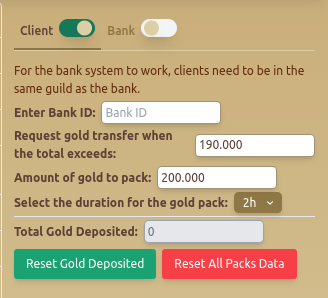
The Bank tab allows users to manage gold transfers between clients and a central bank within the same guild. This system ensures automated resource management.
Features
💰 Client Mode
- Enter Bank ID – Identifies the bank to which gold should be transferred.
- Request Gold Transfer When Total Exceeds – Defines the gold threshold before a transfer is triggered.
- Amount of Gold to Pack – Determines how much gold is placed into each pack.
- Select Duration for the Gold Pack – Sets the time limit for stored gold packs (e.g., 2h).
- Total Gold Deposited – Displays the cumulative amount of deposited gold.
- Reset Gold Deposited – Resets the deposit counter.
- Reset All Packs Data – Clears all stored gold pack configurations.
🏛️ Bank Mode
- Your Bank ID – Displays the bank ID for reference.
- Select Inventory to Use Items for the Pack – Allows users to pick an inventory source for packaging resources.
- Reset All Data – Clears all stored configurations and resets the bank settings.
📜 Example Configuration
- Client Mode is enabled to transfer gold automatically once 190,000 gold is reached.
- The bot packs 200,000 gold into 2-hour duration packs.
- Bank Mode is enabled with inventory selection for efficient item management.
Best Practices
- ✅ Ensure all users are in the same guild for transfers to work.
- ✅ Use Bank Mode efficiently by selecting appropriate inventory items.
- ✅ Regularly Reset Data if adjustments are needed for optimal performance.
FAQ
What is Bank - Client & Bank?
The Bank tab allows users to manage gold transfers between clients and a central bank within the same guild. This system ensures automated resource management.
What are the key features of Bank - Client & Bank?
Key features include: Enter Bank ID – Identifies the bank to which gold should be transferred.; Request Gold Transfer When Total Exceeds – Defines the gold threshold before a transfer is triggered.; Amount of Gold to Pack – Determines how much gold is placed into each pack.
What are recommended settings for Bank - Client & Bank?
Ensure all users are in the same guild for transfers to work. Use Bank Mode efficiently by selecting appropriate inventory items. Regularly Reset Data if adjustments are needed for optimal performance.