
Guide
🎭 Use Costumes
Overview
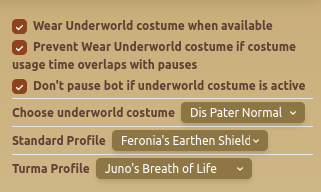
The Use Costumes tab allows users to manage costume-related settings, ensuring the bot automatically equips the correct costume for different scenarios.
Features
🎭 Costume Automation Options
- Wear Underworld Costume When Available – Enables automatic equipping of the Underworld costume.
- Prevent Wearing Underworld Costume If It Overlaps with Pauses – Ensures that costume usage doesn't interfere with scheduled pauses.
- Don't Pause Bot If Underworld Costume Is Active – Prevents bot from stopping if a costume is already active.
🏆 Costume Selection
- Choose Underworld Costume – Selects which Underworld costume to use.
- Standard Profile Costume – Defines the default costume for normal gameplay.
- Turma Profile Costume – Sets a specific costume for Turma mode.
Best Practices
- ✅ Ensure the correct costume profiles are assigned to match gameplay needs.
- ✅ Use prevent costume overlap to avoid interruptions in bot activity.
FAQ
What is Use Costumes?
The Use Costumes tab allows users to manage costume-related settings, ensuring the bot automatically equips the correct costume for different scenarios.
What are the key features of Use Costumes?
Key features include: Wear Underworld Costume When Available – Enables automatic equipping of the Underworld costume.; Prevent Wearing Underworld Costume If It Overlaps with Pauses – Ensures that costume usage doesn't interfere with scheduled pauses.; Don't Pause Bot If Underworld Costume Is Active – Prevents bot from stopping if a costume is already active.
What are recommended settings for Use Costumes?
Ensure the correct costume profiles are assigned to match gameplay needs. Use prevent costume overlap to avoid interruptions in bot activity.