
Guide
🏕️ Expeditions - Expeditions
Overview
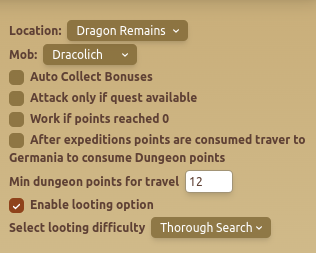
The Expeditions - Expeditions tab is the main Gladiatus expedition bot module. It lets you automate expedition fights, choose the location and mob to target, collect bonuses, and switch between expedition and dungeon routines when your points run low.
Use this guide when you want the Gladiatus bot to handle repeated expedition farming while still respecting quests, travel rules, dungeon points, and looting preferences.
Features
📍 Location & Mob Selection
- Select Location – Choose where to send the bot for expeditions.
- Select Mob – Pick a specific mob to target.
⚔️ Attack & Travel Settings
- Auto Collect Bonuses – Enables automatic collection of expedition rewards.
- Attack Only If Quest Available – Ensures expeditions only occur when they fulfill an active quest.
- Work If Points Reached 0 – If all expedition points are spent, the bot switches to working.
- After Expedition Points Are Consumed, Travel to Germania to Consume Dungeon Points – Automates transitioning between expedition and dungeon activities.
- Min Dungeon Points for Travel – Defines the minimum number of dungeon points required before traveling.
🎒 Looting & Travel Configuration
- Enable Looting Option – Toggles looting behavior for expeditions.
- Select Looting Difficulty – Chooses the looting method (e.g., Thorough Search).
When To Use Expedition Automation
- Use it for daily expedition farming when you want consistent mob attacks without manually checking points.
- Enable Attack Only If Quest Available when your main goal is quest progress instead of raw farming.
- Combine it with dungeon travel when you want the bot to spend both expedition and dungeon points during the same routine.
Recommended Setup
- Start with one reliable location and mob before adding more complex travel behavior.
- Turn on Auto Collect Bonuses so rewards are not left behind.
- Use Attack Only If Quest Available if you are trying to finish quest objectives efficiently.
- Set a realistic Min Dungeon Points for Travel so the bot only switches activities when there is enough value in moving.
- Review looting difficulty after a few sessions and adjust it based on your resource usage.
Common Mistakes
- Picking a location or mob that your character cannot farm consistently.
- Enabling travel rules without checking whether dungeon points are high enough to justify the move.
- Running expedition automation without healing rules configured in the Heal module.
- Using quest-only attacks and then expecting the bot to keep farming when no matching quest is available.
Best Practices
- ✅ Ensure the correct location & mob are selected for optimized farming.
- ✅ Use Auto Collect Bonuses to maximize rewards.
- ✅ Configure travel settings to automate movement between expedition and dungeon modes.
Related Guides
FAQ
Can the Gladiatus bot attack only when an expedition quest is active?
Yes. Enable Attack Only If Quest Available when you want expedition attacks to focus on active quest progress.
Can expedition automation switch to dungeon activity?
Yes. Use the dungeon travel settings and set the minimum dungeon points required before the bot changes activity.
Should I enable looting for every expedition routine?
Use looting when the extra rewards are worth the time and resource cost for your account. If speed matters more, test a lighter looting setup.
FAQ
What is Expeditions - Expeditions?
The Expeditions - Expeditions tab is the main Gladiatus expedition bot module. It lets you automate expedition fights, choose the location and mob to target, collect bonuses, and switch between expedition and dungeon routines when your points run low.
What are the key features of Expeditions - Expeditions?
Key features include: Select Location – Choose where to send the bot for expeditions.; Select Mob – Pick a specific mob to target.; Auto Collect Bonuses – Enables automatic collection of expedition rewards..
What are recommended settings for Expeditions - Expeditions?
✅ Ensure the correct location & mob are selected for optimized farming. ✅ Use Auto Collect Bonuses to maximize rewards. ✅ Configure travel settings to automate movement between expedition and dungeon modes.