
Guide
🏟️ Arena - Arena
Overview
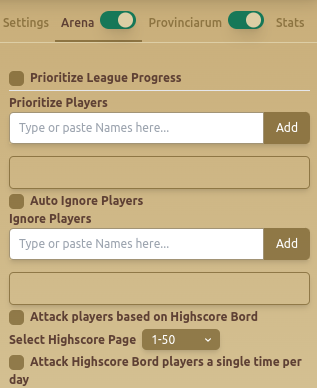
The Arena - Arena tab is the Gladiatus arena bot module for repeatable Arena attacks. It helps you manage priority targets, ignore players you do not want to attack, and use highscore-board targeting when you want broader automated opponent selection.
Use this guide when you want the Gladiatus bot to handle Arena attacks with clearer target rules instead of manually choosing every opponent.
Features
🎯 Player Prioritization
- Prioritize League Progress – Focuses attacks on league advancement.
- Prioritize Players – Users can enter specific player names for targeted attacks.
- Remove All – Clears the priority attack list.
🚫 Ignore Players
- Auto Ignore Players – Enables automatic addition of players to the ignore list.
- Manually Add Ignore Players – Users can enter specific names to avoid.
- Remove All – Clears the ignore list.
🏆 Highscore Board Attacks
- Attack Players Based on Highscore Board – Targets players listed in the highscore rankings.
- Select Highscore Page (1-50) – Filters target selection based on rank pages.
- Attack Highscore Board Players a Single Time Per Day – Ensures each highscore-listed player is attacked only once daily.
When To Use Arena Automation
- Use priority players when you know which opponents are worth attacking for league progress.
- Use ignore players when some opponents are too expensive, too risky, or not worth repeated attempts.
- Use highscore-board attacks when you want a wider target pool without manually building a list.
Recommended Setup
- Start with a short priority list of known targets.
- Enable ignore rules before broad highscore attacks.
- Use Attack Highscore Board Players a Single Time Per Day to avoid repeating poor targets too often.
- Review attack results and adjust priority and ignore lists after each session.
- Pair Arena automation with Gladiatus healing rules so attack routines do not continue below your safe HP threshold.
Common Mistakes
- Running highscore-board attacks without an ignore list.
- Targeting pages that are too strong for your character.
- Forgetting to clear outdated priority players.
- Treating Arena and Turma rules as the same routine even when your opponent pools differ.
Best Practices
- ✅ Use Prioritize Players to target key opponents for efficient progress.
- ✅ Configure Ignore Players to avoid unnecessary battles.
- ✅ Limit highscore attacks to one per day to prevent resource depletion.
Related Guides
FAQ
Can the Gladiatus bot attack specific Arena players?
Yes. Add those names to the priority player list so the bot checks them before broader targeting.
Can I avoid certain Arena opponents?
Yes. Use the ignore list manually, or enable automatic ignore behavior when the module supports it for your routine.
Should I use highscore-board attacks every day?
Use them carefully. Start with limited pages and enable the once-per-day option so the bot does not repeat the same broad target set too aggressively.
FAQ
What is Arena - Arena?
The Arena - Arena tab is the Gladiatus arena bot module for repeatable Arena attacks. It helps you manage priority targets, ignore players you do not want to attack, and use highscore-board targeting when you want broader automated opponent selection.
What are the key features of Arena - Arena?
Key features include: Prioritize League Progress – Focuses attacks on league advancement.; Prioritize Players – Users can enter specific player names for targeted attacks.; Remove All – Clears the priority attack list..
What are recommended settings for Arena - Arena?
✅ Use Prioritize Players to target key opponents for efficient progress. ✅ Configure Ignore Players to avoid unnecessary battles. ✅ Limit highscore attacks to one per day to prevent resource depletion.