
Last updated: 1980-01-011 min read
🏪 Shop - Rules
Overview
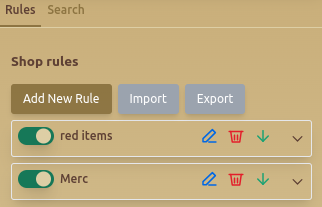
The Shop - Rules tab allows users to automate purchases based on predefined conditions, ensuring efficient acquisition of specific in-game items.
Features
🛍️ Shop Rules
- Add New Rule – Allows users to define automated buying rules.
- Import & Export – Saves or loads buying configurations.
🔄 Custom Shop Rules
Users can define rules for automated purchasing based on specific conditions:
- Set Rule Title – Assigns a name to the purchase rule.
- Select Condition – Filters items by:
- Name Contains – Matches specific keywords (e.g., Elite).
- Item Types – Defines the type of item (e.g., Mercenary).
- Mercenary Min Status – Ensures items meet stat requirements for:
- Strength, Dexterity, Agility, Constitution, Intelligence, Charisma.
- Select Color – Filters items by their in-game rarity colors.
- Auto Buy – Enables automatic purchasing.
- Pick Gold from Packages – Uses stored gold for purchases if needed.
- Send To – Defines where the item is sent (e.g., Inventory).
📜 Example Shop Rule
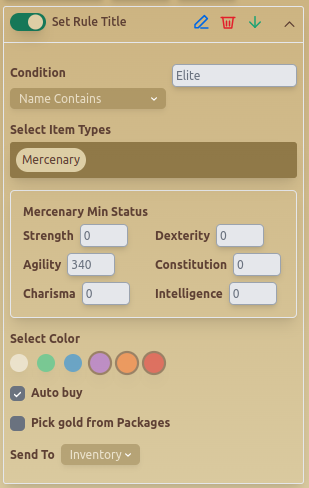
This example sets up an Auto Buy Rule for mercenaries with "Elite" in their name, having at least 340 Agility, and sending them to Inventory.
Best Practices
- ✅ Use Item Type and Name Filters to refine searches.
- ✅ Define Minimum Stats for better selection control.
- ✅ Enable Pick Gold from Packages to avoid interruptions.
FAQ
What is Shop - Rules?
The Shop - Rules tab allows users to automate purchases based on predefined conditions, ensuring efficient acquisition of specific in-game items.
What are the key features of Shop - Rules?
Key features include: Add New Rule – Allows users to define automated buying rules.; Import & Export – Saves or loads buying configurations.; Set Rule Title – Assigns a name to the purchase rule..