
Last updated: 1980-01-011 min read
📦 Packages - Auto Sell
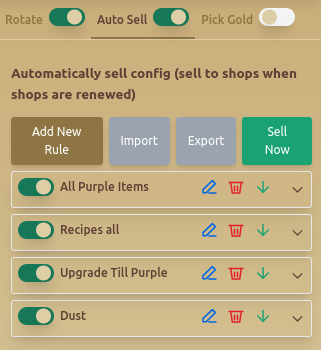
Overview
The Auto Sell tab allows users to configure automated item selling rules, ensuring that selected items are sold at the right time when shops are refreshed.
Features
🛠️ Auto Sell Configuration
- Toggle Auto Sell – Enables or disables automatic selling.
- Sell Now Button – Instantly sells selected items based on the active rules.
📜 Rule-Based Selling System
Users can create custom selling rules for different item categories:
- Add New Rule – Allows defining conditions for automatic selling.
- Import & Export Rules – Save or load different rule sets.
- Editable Conditions – Users can specify item conditions:
- Level Greater Than (X)
- Is or Is Not an Underworld Item
- Other conditions as needed
🎨 Color Selection for Items
- Allows categorization of items based on colors:
- ⚪ White
- 🔵 Blue
- 🔴 Red
- 🟢 Green
✏️ Example Rule Setup
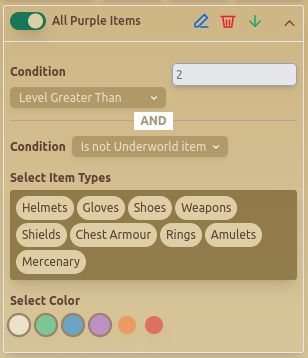
- This example shows an auto-sell rule that:
- Sells all purple items
- Only sells items greater than Level 2
- Excludes Underworld items
- Applies to item types Helmets, Gloves, Shoes, Weapons, Shields, Rings, Amulets, Mercenary, Chest Armour
Best Practices
- ✅ Use Import & Export to quickly apply different selling rules.
- ✅ Be careful with conditions to avoid selling important items.
FAQ
What is Packages - Auto Sell?
The Auto Sell tab allows users to configure automated item selling rules, ensuring that selected items are sold at the right time when shops are refreshed.
What are the key features of Packages - Auto Sell?
Key features include: Toggle Auto Sell – Enables or disables automatic selling.; Sell Now Button – Instantly sells selected items based on the active rules.; Add New Rule – Allows defining conditions for automatic selling..