
🏟️ Arena - Settings
Overview
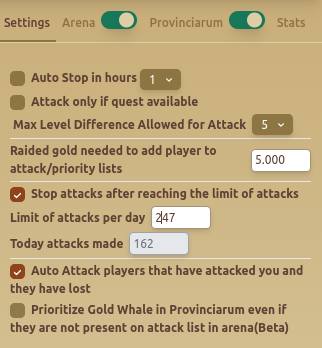
The Arena - Settings tab provides automation options for managing arena battles, setting attack limits, and defining targeting strategies.
Features
🕒 Attack Timing & Limits
- Auto Stop in Hours – Stops attacking after a set duration.
- Stop Attacks After Reaching Limit – Prevents excessive battles beyond the configured limit.
- Limit of Attacks Per Day: Users can define the daily attack limit.
- Today Attacks Made – Displays the number of attacks performed so far.
🎯 Attack Strategy
- Attack Only If Quest Available – Attacks only when a quest requires fights.
- Max Level Difference Allowed for Attack – Restricts attacks to enemies within a level range.
- Raided Gold Needed to Add Player to Priority Lists – Defines the gold threshold before marking a player as a target.
🏆 Revenge & Special Targeting
- Auto Attack Players That Have Attacked You and Lost – Automatically retaliates against weaker opponents.
- Prioritize Gold Whale in Provinciarum (Beta) – Focuses on high-value players even if they are not on the attack list.
Best Practices
- ✅ Use daily attack limits to prevent resource exhaustion.
- ✅ Adjust level difference settings to target optimal opponents.
- ✅ Enable revenge attacks to maximize PvP efficiency.
FAQ
How many times should I attack the same player per day?
Avoid attacking the same player more than 5 times per day. Repeated farming often leads to player reports, which can trigger manual checks.
FAQ
What is Arena - Settings?
The Arena - Settings tab provides automation options for managing arena battles, setting attack limits, and defining targeting strategies.
What are the key features of Arena - Settings?
Key features include: Auto Stop in Hours – Stops attacking after a set duration.; Stop Attacks After Reaching Limit – Prevents excessive battles beyond the configured limit.; Limit of Attacks Per Day: Users can define the daily attack limit..
What are recommended settings for Arena - Settings?
✅ Use daily attack limits to prevent resource exhaustion. ✅ Adjust level difference settings to target optimal opponents. ✅ Enable revenge attacks to maximize PvP efficiency.